exope.Scratcher
Drop a beat and a vocal. Press AUTO. It scratches every chop of your sample, on the bar, and you drag the take into your DAW.
USD12.99
BUY NOW SCRATCH IT IN THE BROWSER
VERSION 1.0.0 · STANDALONE · WINDOWS 10 / 11, 64-BIT
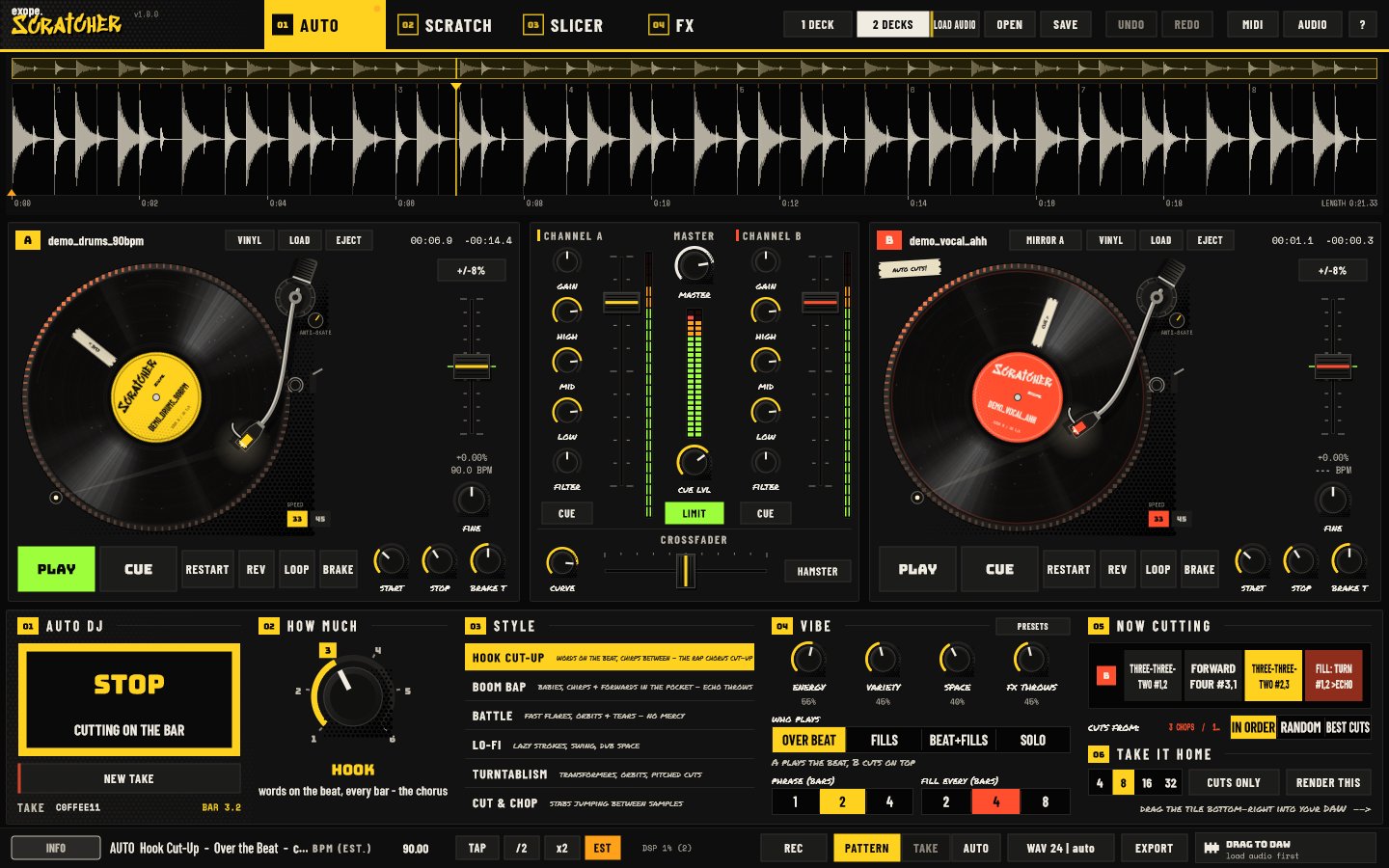
Drop a beat and a vocal. Press AUTO. It scratches every chop of your sample, on the bar, and you drag the take into your DAW.
USD12.99
BUY NOW SCRATCH IT IN THE BROWSER
VERSION 1.0.0 · STANDALONE · WINDOWS 10 / 11, 64-BIT
A beat on deck A, a vocal on deck B, or one file for both. Hit AUTO and from the next bar line the record on deck B scratches over the beat. The beat never stops. NEW TAKE rolls a new performance on the next phrase.
ON THE BAR · NEW TAKE · SAME TAKE = SAME CUTS
The sample is cut into chops, attack to attack. AUTO walks through all of them, in order or in a new random order each pass, and gives every chop its own move: forward, chirp, baby, stab, drag, transform, flare, tear, scribble. The hand gets slower or faster with every chop, and the stroke runs through the whole sound.
IN ORDER · RANDOM · BEST CUTS · UP TO 64 CHOPS
HOW MUCH goes in six steps from a single accent every four bars to all-out battle density. STYLE picks the hand: hook cut-up, boom bap, battle, lo-fi, turntablism or cut and chop. Rhythm first, like a DJ thinks: every bar sits on the 1/16 grid and grooves with the hits of your beat.
TOUCH · ANSWER · HOOK · GROOVE · ROUTINE · BATTLE
Two turntables and a battle mixer. Grab the record with the mouse and scratch: forwards, backwards, through zero, at the speed of your hand. Motor, slipmat, tonearm, 33 and 45, pitch, crossfader with curve and hamster. Seven vinyls and five labels to pick from.
33 / 45 · PITCH ±8…100 % · CURVE · HAMSTER · MIDI JOGS
ENERGY pushes the hand, VARIETY changes the move and the speed from chop to chop, SPACE leaves air. Echo throws ring out at the end of a section. In BEAT + FILLS deck A throws spinbacks, drop-outs, brakes and stutters and lands back on the one.
ENERGY · VARIETY · SPACE · FX THROWS · FILLS
Render 4, 8, 16 or 32 bars from the first downbeat, with the beat or CUTS ONLY as a stem, and drag the tile into FL Studio, Cubase, Reaper or Ableton Live. Or press REC: everything you play is rendered again, exactly as you heard it.
WAV · AIFF · FLAC · MP3 · DRAG TO DAW
Grab the record and move it back and forth. Hold SPACE or CUT to close the fader. Or press AUTO and let it cut the four chops of the sample over the beat. A browser sketch with a synthetic test sample; the program does it with yours.
grab me
PRESS AUTO OR GRAB THE RECORD
Scratching is rhythm. Where a cut lands, how long it rings, how fast the hand moves. exope Scratcher plays your sample like a record on a turntable, cut by a fader, and AUTO plays it like a DJ: chop after chop, on the bar.
no loops of canned scratches. your sample, cut live.
boom bap
Scratches over your beat by itself, on the 1/16 grid, in six styles and six amounts, with fills and echo throws.
The whole sample cut into chops; each one gets its own scratch, hand speed and weight, a new one on every pass.
Or keep to the best words and hits the analysis finds, the hook coming back like a chorus.
Motor, slipmat, tonearm, 33 and 45, pitch, reverse, brake. The sound follows your hand through zero and back.
Gain, three-band EQ with kills, filter, crossfader with curve and hamster, headphone cue, limiter.
Fourteen scratch families, from baby to scribble, on any length and speed. RANDOMIZE with AMOUNT, seeds you can keep.
Grid, transient or by hand, pads and MIDI notes, one-shot or gate, choke, reverse, pitch per slice.
Tempo-synced dub echo with throws, reverb, drive, crush, vinyl crackle, auto gain for quiet a cappellas.
Record a take: everything you play is rendered again offline, bit for bit as you heard it.
A render waits ready in the background. Drag the tile onto a track; WAV files carry the tempo.
Learn any knob, fader, button or platter. Map AUTO and NEW TAKE to pads and perform with them.
Save everything with its seeds, autosave every 30 seconds, crash recovery, factory and user presets.
Rendered from exope Scratcher 1.0.0 with synthetic test audio. Click to enlarge.
| FORMAT | Standalone program (no DAW needed) · delivers WAV / AIFF / FLAC / MP3 and Drag to DAW |
|---|---|
| SYSTEM | Windows 10 / 11, 64-bit · WASAPI (low latency or exclusive), any audio interface Windows sees |
| SOURCES | WAV, AIFF, FLAC, MP3, OGG, up to 15 minutes per file · never modified |
| AUTO | 6 styles · 6 amounts · chops in order, random or best cuts (up to 64 chops) · 1, 2 or 4-bar phrases · fills every 2, 4 or 8 bars |
| DECKS | 2 turntables · 33 / 45 · pitch ±8, 16, 50, 100 % · motor start / stop / brake · 7 vinyls, 5 labels |
| PATTERNS | 14 families · 1 beat to 4 bars · RANDOMIZE with 16 lockable dimensions · seeds |
| RENDER | Pattern, take or AUTO · 16 / 24-bit, 32-bit float · 44.1 to 96 kHz · MP3 128 to 320 kbps (Windows encoder) |
| MIDI | All devices, hot-plug · notes, CC (absolute and relative jogs), pitch bend · MIDI Learn on every control |
| LICENCE | Licensed, not sold: one licence works on 2 computers (licence agreement). Activated online once, then it works offline. Without a licence it runs as a demo. |
| UPDATES | Built in and signed: the program tells you when a new version is out and downloads its installer for you. |
| IN THE BOX | Installer · English PDF manual (20 pages) · licence agreement (EULA) · licence texts |
| PRICE | USD 12.99 |
AVAILABLE NOW · v1.0.0
USD12.99
Try it before you buy: without a licence exope Scratcher runs as a demo. Everything works, but every 15 seconds the sound stops for 3 seconds, in exports too.
BUY NOWThe newest installer, straight from exope.art. Without a licence exope Scratcher runs as a demo: everything works, but every 15 seconds the sound stops for 3 seconds, in exports too. Buy a licence on itch.io, activate it and the gaps are gone.
No. You scratch with the mouse (or a touch screen) on the record on screen, and AUTO needs nothing at all. A MIDI controller works too: map its jogs, faders and pads with MIDI Learn.
No, it is a program of its own for Windows, so it does not need a DAW. You render what you make and drag it into your DAW, or export WAV, AIFF, FLAC or MP3.
Your sample: the file on deck B (or on deck A when deck B mirrors it). It is cut into chops and every chop gets its own scratch on the bar. No canned scratch loops are played.
Yes. Without a licence exope Scratcher runs as a demo: everything works, but every 15 seconds the sound stops for 3 seconds, also in the files it renders. Activate a licence and the gaps are gone.
exope Scratcher is licensed, not sold. One licence works on 2 computers at a time, and exope. administers every licence: it issues the keys, activates and deactivates computers. To move it, deactivate a computer in the program or write to us. Read the full licence agreement (EULA).
Yes, what you make is yours and exope. asks no royalties. Make sure you have the rights to the audio you load: samples taken from records or other people's recordings may be protected by copyright.
Only to activate the licence and to look for updates. After the activation it works offline.
Not yet. It runs on Windows 10 / 11 (64-bit) for now.
The installer isn't code-signed yet, so SmartScreen shows a warning the first time. Click More info → Run anyway. The installer only touches its own files and can UPDATE, REPAIR, RESET or UNINSTALL later.