exope.Ultra Vocal Stabilizer
It rides your vocal the way an engineer rides the fader. Every line to your loudness, every word in its place, before the compressor.
USD9.99
VERSION 1.1.0 · VST3 + STANDALONE · WINDOWS x64
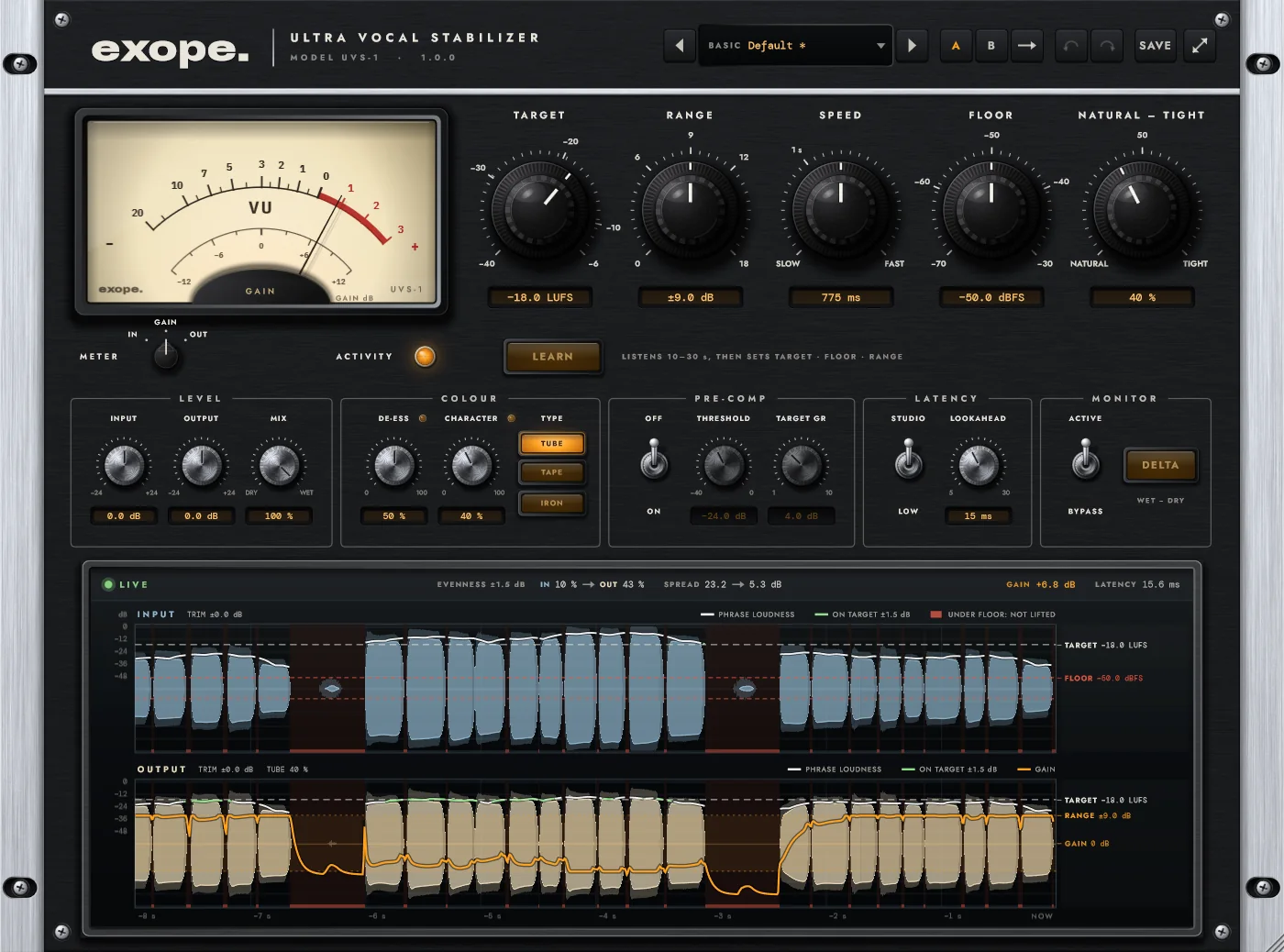
It rides your vocal the way an engineer rides the fader. Every line to your loudness, every word in its place, before the compressor.
USD9.99
VERSION 1.1.0 · VST3 + STANDALONE · WINDOWS x64
The Phrase Rider follows the loudness of each line, K-weighted like a loudness meter, and moves the gain so the line sits at your Target. A whispered verse and a shouted chorus come out at the same level. Range sets how far it may go, Speed how quickly.
TARGET −40…−6 LUFS · RANGE ±0…18 dB · SPEED 300 ms…2 s
Inside the line, the Syllable Leveler lifts the quiet syllables and takes the loud ones down, measured against the phrase. Natural keeps the life of the performance, Tight makes it even. DELTA lets you hear exactly what changes.
NATURAL-TIGHT · DELTA · MIX
Below Floor nothing is ever lifted: pauses, breaths, room and bleed stay where they are, and breaths and noise are taken down, up to 10 dB. The displays shade everything under Floor in red, so you see where the line is.
FLOOR −70…−30 dBFS · UP TO −10 dB ON BREATHS
An “s” never counts as level, so it is not pushed up and does not duck the word. De-ess takes the sibilants down above 5 kHz. Character adds an analog colour after the leveling: Tube, Tape or Iron, level-compensated, with a lamp that glows while it works.
DE-ESS UP TO −10 dB · TUBE · TAPE · IRON · 2× OVERSAMPLING
Two displays show the vocal coming in and going out, measured with the same detector, with the gain drawn over it. Stop the transport and turn a knob: PREVIEW recomputes the last seconds with the new settings. LEARN listens to 10 to 30 seconds of your verse and sets Target, Floor and Range.
LIVE · PREVIEW · LEARN · VU: IN / GAIN / OUT
In Pre-Comp mode UVS feeds the compressor after it exactly the level for the gain reduction you want. Studio looks ahead, so the gain is already right when a line begins; Low Latency runs at zero latency for tracking.
STANDARD / PRE-COMP · STUDIO 5 TO 30 ms LOOKAHEAD · LOW LATENCY 0 ms
Three lines of a vocal: sung quietly, then loudly, then in between, with breaths in the gaps. Switch UVS on and turn the knobs. This is an illustration of what UVS does; the real one listens to your vocal.
SPREAD 26.0 dB
A compressor reacts to peaks. A vocal sung quietly in one line and loudly in the next still comes out uneven, and you end up riding the fader by hand. UVS does the riding first, so the compressor after it can be gentle.
A level tool, not a compressor: it never changes the shape of the peaks.
K-weighted detector in the vocal band (150 Hz to 6 kHz). Each line to Target within ±Range, at the Speed you set.
Quiet syllables up, loud ones down, relative to the phrase. Natural-Tight sets how much.
Nothing under Floor is lifted. Breaths and noise go down by up to 10 dB, shown in red on the displays.
Sibilants never count as level and are taken down above 5 kHz, with a lamp that flashes on every one.
Tube, Tape or Iron after the leveling, level-compensated. 2× oversampling in Studio, anti-aliased in Low Latency.
Instead of a loudness target, UVS feeds your compressor the level for the gain reduction you choose.
Studio looks ahead 5 to 30 ms, reported to the host. Low Latency runs at zero for recording.
Listens to 10 to 30 s of your vocal and sets Target, Floor and Range, gliding them into place.
With the transport stopped, a knob move recomputes the last seconds, so you see the result before you play.
Presets by category, your own presets, A / B and undo for every move.
A real needle: IN and OUT read 0 VU at your Target, GAIN shows the move around the middle.
Every control can be automated, and GAIN OUT sends the gain UVS applies to your DAW as an automation lane.
Rendered from UVS 1.0.0 with the synthetic test vocal. Click to enlarge.
| FORMAT | VST3 plugin + standalone app |
|---|---|
| SYSTEM | Windows 10 / 11, 64-bit · any 64-bit VST3 host (Cubase, Nuendo, FL Studio, Studio One, Reaper, Ableton Live, Bitwig…) |
| CHANNELS | Mono · stereo · mono in / stereo out |
| AUDIO | 44.1 to 192 kHz · 32- and 64-bit processing |
| DETECTOR | K-weighted (BS.1770), vocal band 150 Hz to 6 kHz, sibilants excluded, 1 ms control rate |
| LEVELING | Target −40…−6 LUFS · Range ±0…18 dB · Speed 300 ms…2 s · Floor −70…−30 dBFS · Natural-Tight |
| LATENCY | Studio: lookahead 5 to 30 ms, reported to the host (15 ms at 48 kHz = 751 samples) · Low Latency: 0 |
| CPU | About 0.2 % of one laptop core, 0.7 % with Character at 100 % (stereo, 48 kHz) |
| WINDOW | 1160 × 860, scales 75 to 200 %, kept with the project |
| LICENCE | Licensed, not sold: one licence works on 2 computers (licence agreement). Activated online once, then it works offline. Without a licence it runs as a demo. |
| UPDATES | Built in and signed: the plugin tells you when a new version is out and downloads its installer for you. |
| IN THE BOX | Installer · English PDF manual (24 pages) · licence agreement (EULA) · licence texts |
| PRICE | USD 9.99 · one payment, no subscription |
AVAILABLE NOW · v1.1.0
USD9.99
Try it before you buy: without a licence UVS runs as a demo. Everything works, but every 15 seconds the sound stops for 3 seconds.
BUY NOWThe newest installer, straight from exope.art. Without a licence UVS runs as a demo: everything works, but every 15 seconds the sound stops for 3 seconds. Buy a licence on itch.io, activate it and the gaps are gone.
No. UVS rides the level the way you would ride a fader: whole lines and words, never the shape of the peaks. Put it first on the vocal (after clean-up such as noise reduction or pitch correction), then your compressor, EQ and the rest.
Any 64-bit VST3 host on Windows. UVS keeps all its settings, its presets and the size of its window inside your project. There is a standalone app too.
In Studio it looks ahead (15 ms by default) and tells your DAW, which lines everything up. For recording, switch to Low Latency: zero latency, and the leveling still works.
Yes. Without a licence UVS runs as a demo: every control works, but every 15 seconds the sound stops for 3 seconds. Activate a licence and the gaps are gone, mid-song.
exope Ultra Vocal Stabilizer is licensed, not sold. One licence works on 2 computers at a time, and exope. administers every licence: it issues the keys, activates and deactivates computers. To move it, deactivate a computer in the plugin or write to us. Read the full licence agreement (EULA).
Only to activate the licence and to look for updates. After the activation it works offline.
Not yet. It runs on Windows 10 / 11 (64-bit) for now.
The installer isn't code-signed yet, so SmartScreen shows a warning the first time. Click More info → Run anyway. The installer only touches its own files and can UPDATE, REPAIR, RESET or UNINSTALL later.